- Get Started
- User Guide
- How to
- ** How to use event_type category to do more
- How to Activate EventON
- How To Allow Users to Submit Events and Create an Events Listing Page
- How to apply a patch fix
- How to Bulk Update Language Translations Using the Import/Export Tool
- How to cancel addon subscription before auto renew
- How to Deactivate EventON Addon Licenses
- How To Display or Hide the Live Now Icon
- How to Enable Auto-updates for EventON
- How to find your EventON license key
- How to Fix a Broken Sidebar Caused by the EventON Widget
- How To Hide Blank Rows On the Calendar EventTop
- How To Set Up and Use the Filter Bar on Calendars
- How to Set Up Health Guidelines for EventON and Extend It
- How to Setup & Use Custom Fields for Events
- How to setup & use multi data types
- How to Setup Basic Paypal for Events
- How to show past events
- How to show your calendar on external sites using an iFrame
- How To Turn on Sort Options On Your Calendar
- How To Upgrade Your EventON Addon License
- How to Use Hashtags to Link to Event Sections
- How to Use Single Event Data Values
- How to Use the EventCard Designer
- How To Use the EventON Shortcode Executor(ESE) Widget
- How To Use The EventTop Designer
- How To Use the ICS Import Tool
- How to Use Virtual Visible Event End Time for Events with Limited Visibility but Extended Durations
- Using an SMTP Mail Plugin To Solve Email Delivery Issues in EventON
- General
- Basic System Requirements for EventON
- Best Practices Before Doing an Addon Update
- How to Delete Old Events from WordPress Trash Automatically
- How To Upgrade From Lite to Full Version
- I am confused about Event Type categories
- What is the calendar filter
- Why am I unable to proceed with the checkout for addon purchases?
- Troubleshooting
- ** What to check if eventON is not working
- How to debug for PHP code errors
- How to debug Javascript interactive issues
- How to find if an issue is coming from eventON
- How to fix font awesome icons not working on your site
- How to fix style override issues
- Increasing the WordPress Memory Limit
- Troubleshooting Using the Health Check Plugin
- Why is Location Google Map grayed out or not displayed on Event Card
- Virtual Events
- Frequently Asked Questions
- Code snippets
- CODE: To add additional healthcare guidelines
- How to add new social share icons
- How to change “events” slug & rewrites
- How to customize the eventtop date format
- How to hook into eventTop
- How to increase event type category count
- How to load EventON scripts to a page
- How to show additional custom data in the eventCard
- CODEX
- Event Post Meta Variables
- Hooks: Actions & Filters
- How to Add a Custom Event Status
- How to Customizing the Upcoming Events List on Event Taxonomy Archive Pages
- How to enable Plugin Editor for WordPress
- How to get more custom event data fields
- How to Include Additional Languages
- How to use Actions and Filters
- Taxonomies of EventON
- Template Tag: add_eventon
- Other
- Tricks and Tips
- ** Override CSS in your calendar
- How to create events that goes past midnight
- How to customize Events archive page
- How to customize location and organizer archive page
- How to override event colors with event type colors
- How to show featured image on eventTop
- How to show various information on the eventTop
- How to translate EventON with WPML on the front-end
- One solution for /events slug not working
- Various Creative Ways to Use Multi Data Types
- APIs
- Addons
- Action User
- ActionUser Paid Feature Events
- ActionUser Plus
- Advent Calendar
- Bookings
- Check-ins
- Countdown
- CSV Importer
- DailyView
- Dynamic Pricing
- Event API
- Event Dynamic Pricing
- Event Lists
- Event Map
- Event Photos
- Event Reviewer
- Event Search
- Event Seats
- Event Slider
- Event Tickets
- Auto Complete Ticket Order
- Auto re-stocking refunded, cancelled or failed orders
- Changelog for Event Tickets
- CODE: How to send Emails as Bcc
- How to add additional data to confirmation email
- How to add additional fields at checkout
- How to add additional fields to download attendees CSV file
- How to customize ticket email template
- How to manage capacity separately for repeat events
- How to set up Event Tickets
- How to set up variable prices for Tickets
- How To Switch From WooCommerce Blocks to Shortcode-Based Cart & Checkout Pages
- Event Wishlist
- Filters Plus
- FullCal
- ICS Importer
- Include Anything
- Lists & Items
- Moon Data
- PDFer
- Polls
- QR Code
- Reminders
- Repeat Customizer
- RSS Feed
- RSVP Events
- RSVP Events Invitees
- RSVP Events Waitlist
- RSVP Points
- Single Events
- Speakers & Schedule
- Subscriber
- Sync Events
- Tickets Waitlist
- Variations & Options
- Virtual Plus
- Weather
- WeeklyView
- YearlyView
- Policies
- Server Related
- Shortcode
- Translation & Languages
How to Customizing the Upcoming Events List on Event Taxonomy Archive Pages
Last Updated: February 11, 2026
EventON displays a list of upcoming events on taxonomy archive pages (e.g. event types, event location, event organizer etc.) using a shortcode. You can customize this list — number of events, layout, images, lightbox behavior, etc. — without modifying the plugin.
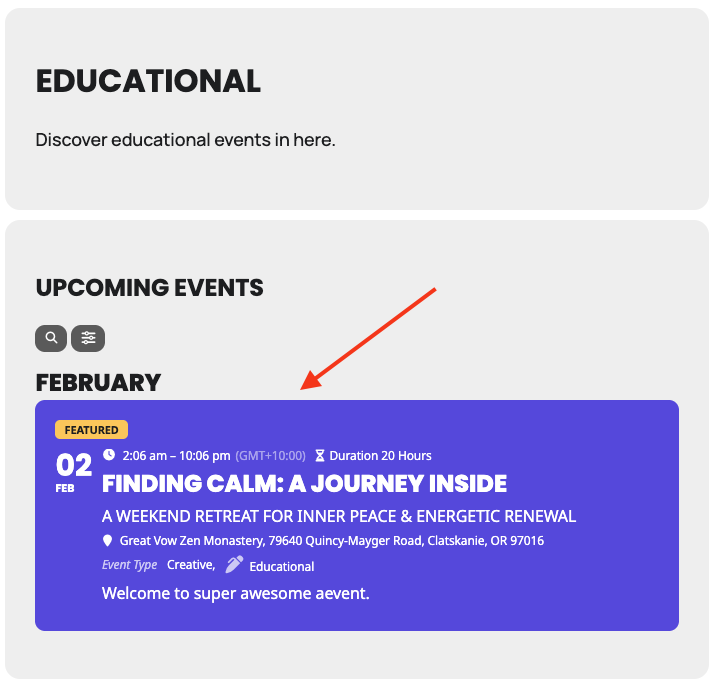
How it works
EventON provides the filter `evo_tax_archieve_page_shortcode` that lets you modify the shortcode arguments right before the upcoming events list is rendered.
Filter signature:
add_filter( 'evo_tax_archieve_page_shortcode', 'your_function_name', 10, 3 );
function your_function_name( $shortcode_args, $taxonomy_slug, $term_id ) {
  // modify $shortcode_args here return $shortcode_args;
}- $shortcode_args — array of shortcode parameters (what you want to change)
- $taxonomy_slug — current taxonomy (event_type, event_location, event_organizer, etc.)
- $term_id — ID of the current term/archive being viewed
Where to place the code
Paste your custom code in one of these locations (best practice order):
- Child theme’s functions.php
- Custom functionality plugin
- Code Snippets plugin (recommended for non-developers)
Example: Basic customization
add_filter('evo_tax_archieve_page_shortcode', 'customize_eventon_tax_upcoming', 10, 3);

function customize_eventon_tax_upcoming($args, $taxonomy, $term_id) {

    // Apply changes to all taxonomy archive pages
    $args = array_merge($args, [
        'number_of_months'   => 6,           // look ahead 6 months
        'event_count'        => 10,          // show max 10 events
        'show_et_ft_img'     => 'yes',       // display featured images
        'eventtop_style'     => '2',         // clean / minimal layout
        'hide_mult_occur'    => 'yes',       // hide duplicate repeating events
        'hide_empty_months'  => 'yes',
        'ux_val'             => '3',         // open events in lightbox
        'show_location'      => 'yes',
        'show_etime'         => 'yes',       // show end time
        'show_year'          => 'no',
    ]);

    return $args;
}Conditional customization (recommended for most projects)
Apply changes only to specific taxonomies or even specific terms.
Example: Different style only for event locations
add_filter('evo_tax_archieve_page_shortcode', 'custom_location_archive_events', 10, 3);

function custom_location_archive_events($args, $taxonomy_slug, $term_id) {
    if ($taxonomy_slug !== 'event_location') {
        return $args;
    }

    $args['eventtop_style']     = '0';          // boxed style
    $args['show_et_ft_img']     = 'yes';
    $args['number_of_months']   = 4;
    $args['event_count']        = 8;
    $args['show_location']      = 'no';         // redundant on location archive
    $args['ux_val']             = '3a';         // lightbox + external link when available

    return $args;
}Most useful shortcode parameters for taxonomy archives
| Parameter | Common Values | Purpose |
| number_of_months | 3-12 | Months to display ahead |
| event_count | 5-20 | Maximum total events to show |
| hide_mult_occur | yes / no | Hide duplicate occurrences of repeating events |
| show_et_ft_img | yes / no | Show featured image on event top |
| eventtop_style | 1, 2 | 1 = Colorful EventTop, 2 = Colorful with gap between. etc., |
| ux_val | X, 2, 3, 3a | Click behavior: 3 = lightbox, 3a = ajax lightbox |
| hide_empty_months | yes / no | Skip months with no events |
| show_year | yes / no | Show year in month headings |
Read Shortcode Guide for more Shortcode Parameters.
Tips
- Use event_count when you want a fixed number of events instead of time-based.
- Combine hide_mult_occur=yes with event_count for cleaner lists.
- Test lightbox behavior (ux_val) — 3 is usually the best balance.
- If you want completely different content, consider overriding the template instead of just modifying the shortcode.
Did this article help you?
- CODEX
- Event Post Meta Variables
- Hooks: Actions & Filters
- How to Add a Custom Event Status
- How to Customizing the Upcoming Events List on Event Taxonomy Archive Pages
- How to enable Plugin Editor for WordPress
- How to get more custom event data fields
- How to Include Additional Languages
- How to use Actions and Filters
- Taxonomies of EventON
- Template Tag: add_eventon